Your music. Your pace.

Listen.
See.
Practice.
Play.

Get closer to the music
you want to play.

Start with a song. Break it down, hear every part and practise at your own pace. DaCapo Studio brings your music and your practice into one integrated workspace.

For musicians who learn by listening and playing.

New in 1.4 See your sound. Take control from your wrist.
DaCapo Studio, in action2:31
01

Bring a song.

Search Apple Music, import your own tracks or identify music with Shazam®.

02

Make it a practice project.

Keep sections, loops, analysis, notes and recordings together with your music.

03

Find your way into it.

Isolate an instrument, slow things down and work on the part you want to learn.

New in DaCapo Studio 1.4

See your sound.
Shape your practice.

Explore the sound you make, follow your pitch as you play or sing, and keep your practice controls close with the new Apple Watch companion.

DaCapo Studio on iPad and iPhone showing Sound Scaper and Dynamic Pitch Line, alongside the Apple Watch companion in a music studio.
Sound Scaper · Live sound & pitch

Make your sound visible.

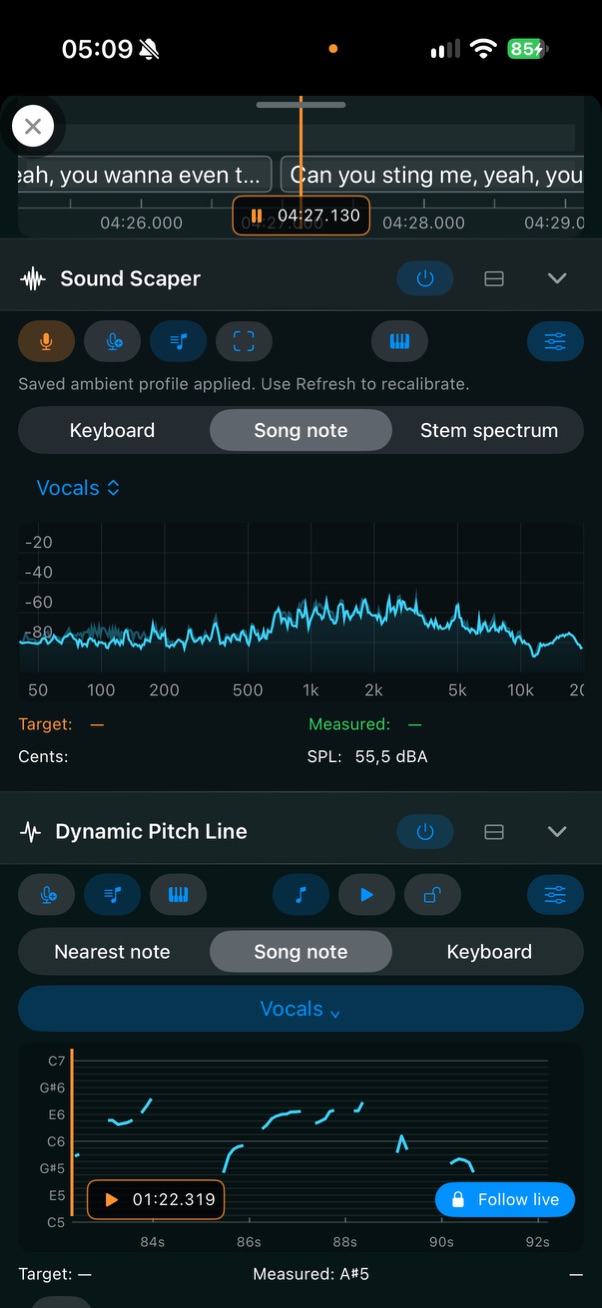
See the frequency spectrum of your voice or instrument as you play. Choose a note on the keyboard, follow an analysed song note or compare with a separated instrument’s spectrum.

Live pitch and target feedback help you find the note and explore the sound around it.

Sound Scaper displaying a live frequency spectrum, measured pitch and pitch-match feedback, with Dynamic Pitch Line below.
Dynamic Pitch Line · Pitch over time

Follow every phrase.

Watch your pitch take shape as a continuous line. See held notes, slides and vibrato, with the nearest note, a song note or a keyboard note as your reference.

Browse and replay your pitch history. With Dynamic Pitch Line on, Recorder can keep the pitch trace alongside your take for review.

Dynamic Pitch Line following a vocal phrase as a cyan pitch trace against a musical note grid, with song-note targeting selected.

Live pitch tracking is designed for one voice or instrument note at a time.

Meet the Apple Watch companion

A closer listen

Find your part.
Understand what you hear.

From the whole song to the smallest detail, make the music easier to explore.

Instrument separation & mixer

Hear it. Then play it.

Separate instruments and build your own practice mix. Isolate a part to hear it clearly, then reduce or mute it and play the part yourself.

Your mix works with loops, slowdown, metronome and Practice Assistant.

Instrument mixer with separate levels, mute and solo controls for vocals, guitar, piano, bass, drums and other instruments.
Melody / Beat Track

See the music unfold.

Explore melody, polyphonic notes, chords, beats and drum events. Analyse tempo, key and musical structure to connect what you hear with what you see.

Go deeper by analysing separated instrument tracks individually.

Melody / Beat Track showing coloured notes, chord names, beat markers and a piano keyboard alongside synced lyrics.
A collection of songs organised as reusable practice projects. Named song sections with start and end positions, loop controls and playback speed.

One section at a time

Stay with the
tricky bit.

That riff. That transition. That drum groove. Give it the time it needs with named song sections, A–B repeat and pitch-stable slowdown.

A little structure. A lot of progress.

Let Practice Assistant guide a sequence of tempos, loops, metronome settings, layouts and instrument mixes.

Pick up where you left off.

Organise projects into groups for setlists, lessons, workshops or your own collections. Keep projects and recordings available across devices with iCloud.

Less reaching. More playing.

Made for the moments
your hands are busy.

Performance Mode puts larger controls and quick actions within reach. Turn your iPhone to landscape for a dedicated, customisable Performance View.

Landscape Performance View with a waveform, piano keyboard and large buttons for sections, recording, playback, instrument mix and Practice Assistant.
Performance View on iPhoneSet up your controls. Stay in the music.

New in 1.4 · Apple Watch companion

Your practice.
At your wrist.

Keep your iPhone in place and control DaCapo Studio from your Apple Watch. See the current song and section, pause playback or move to the next part without reaching for your phone.

Stay in the flow.

Adjust playback speed with the Digital Crown, switch looping on or off, and mute or solo your selected instrument.

Catch the next take.

Start and stop recording on your iPhone from your wrist. Browse practice projects or control JukeBox when it’s time to listen.

Works with DaCapo Studio open on your paired iPhone.

All within reach

A place for your whole practice.

Keep your place.

Synced lyrics and notes keep your cues, ideas and reminders alongside the music.

Find your time.

Choose from multiple metronome modes to support the way you practise.

Get set to play.

A tuner and SPL meter are right there when you need them.

Hear your progress.

Record practice sessions, listen back and keep track of the details you want to work on.

For teachers & students

Keep the lesson
going.

Share the music, the exercise and the feedback — all in the context of the song.

Send something to work on.

Share an individual project or a complete project group for a lesson, workshop or setlist.

Listen to what comes back.

Receive recorded practice sessions through AirDrop®, iMessage, email or NFC touch.

Make feedback part of the music.

Return ratings, remarks and notes that appear during project playback. Merge imported projects with existing work to keep the exchange moving.

Off the practice clock

Sometimes, just listen.

JukeBox creates Dynamic Playlists for a personalised, ad-free listening experience. Add optional hourly news streams to stay informed along the way.

Your next practice starts here

Make the song
your own.

Learning a riff. Preparing a setlist. Teaching a student.
Bring your music to DaCapo Studio.

Download on the App Store

Optional in-app purchases unlock Premium features.
Choose monthly, yearly or Lifetime Premium.